How internet coverage actually works in a home.
Reliable, fast Wi-Fi in every room isn't a router problem — it's a cabling problem. Paul explains where the incoming signal enters, how it's distributed by wired Cat cabling and a network switch, and how ceiling access points give you seamless coverage upstairs, downstairs and in the garden.
1. The incoming signal
The internet enters a UK home in one of a few ways:
- Full Fibre (FTTP) — a fibre optic cable arrives at a small wall box called an ONT (Optical Network Terminal). This is the demarcation point provided by Openreach, CityFibre or a similar network. The ONT converts light into an Ethernet signal on a standard RJ45 socket.
- FTTC / VDSL — copper phone line to a street cabinet, then into a master socket and a DSL modem/router.
- 4G / 5G fixed wireless — a rooftop or window antenna feeds a router with a SIM in it.
- Starlink / satellite — a rooftop dish feeds a PoE injector and router.
Whichever it is, the important thing is the same: it terminates on a single Ethernet port. Everything downstream is under Paul's control — and that's where structured cabling starts to earn its keep.
2. The router (or the router/gateway)
The router does three jobs: it talks to the internet provider, it hands out IP addresses on your home network, and — on most consumer units — it broadcasts Wi-Fi. In a properly cabled home, Paul often turns off the router's Wi-Fi and lets purpose-built access points do that job much better. The router sits in the cupboard or utility room next to the ONT and does the routing; the APs do the radio.
3. Why a network switch
A router typically has four LAN ports. In a structured install you might have twelve, twenty, or thirty wall points across the house — plus access points, a TV, a games console, a NAS and cameras. A network switch is a simple box that expands one router port into many. Paul mounts it in the same cabinet as the router and patches every cable in the house into it.
Two features matter for a modern home:
- PoE (Power over Ethernet) — the switch sends both data and power down the same Cat cable. Ceiling access points, IP cameras and door intercoms then need one cable only. No spur, no plug top, no separate power supply.
- Managed vs unmanaged — for most homes an unmanaged PoE+ switch is fine. Where the client wants VLANs (e.g. keeping CCTV or a guest network separated from the main LAN), Paul fits a managed switch such as a Ubiquiti or TP-Link Omada unit.
4. The cabling itself
From the switch, individual "home runs" of Cat cable go to each wall point, TV location and access-point position. Never daisy-chained — every cable is a dedicated run back to the cabinet. This is what makes structured cabling reliable, diagnosable and upgradeable.
| Grade | Real-world speed | Where Paul uses it |
|---|---|---|
| Cat5e | 1 Gbps up to 100 m | Legacy grade. Fine for existing runs feeding a single access point or IP camera, but not what Paul installs new. |
| Cat6 | 1 Gbps up to 100 m · 10 Gbps up to ~55 m | Sensible default for most domestic structured cabling. Better crosstalk performance than Cat5e and comfortably future-proofs a typical home. |
| Cat6a | 10 Gbps up to 100 m | Paul's recommendation for premium installs, longer runs, PoE++ (60 W / 90 W) access points, and any home office where 10 GbE at the desk is on the horizon. |
| Cat7 / Cat8 | 10 – 40 Gbps | Rarely justified in a home. Non-standard connectors, tricky to terminate, and consumer equipment doesn't take advantage of them. Paul only fits these on specific client request. |
All installation cable is solid-core (better performance, longer reach) and terminates onto keystones. Only the short leads between a wall socket and a device — or between the patch panel and the switch — are stranded "patch" cable.
5. Plugs, jacks and what UK installers actually fit
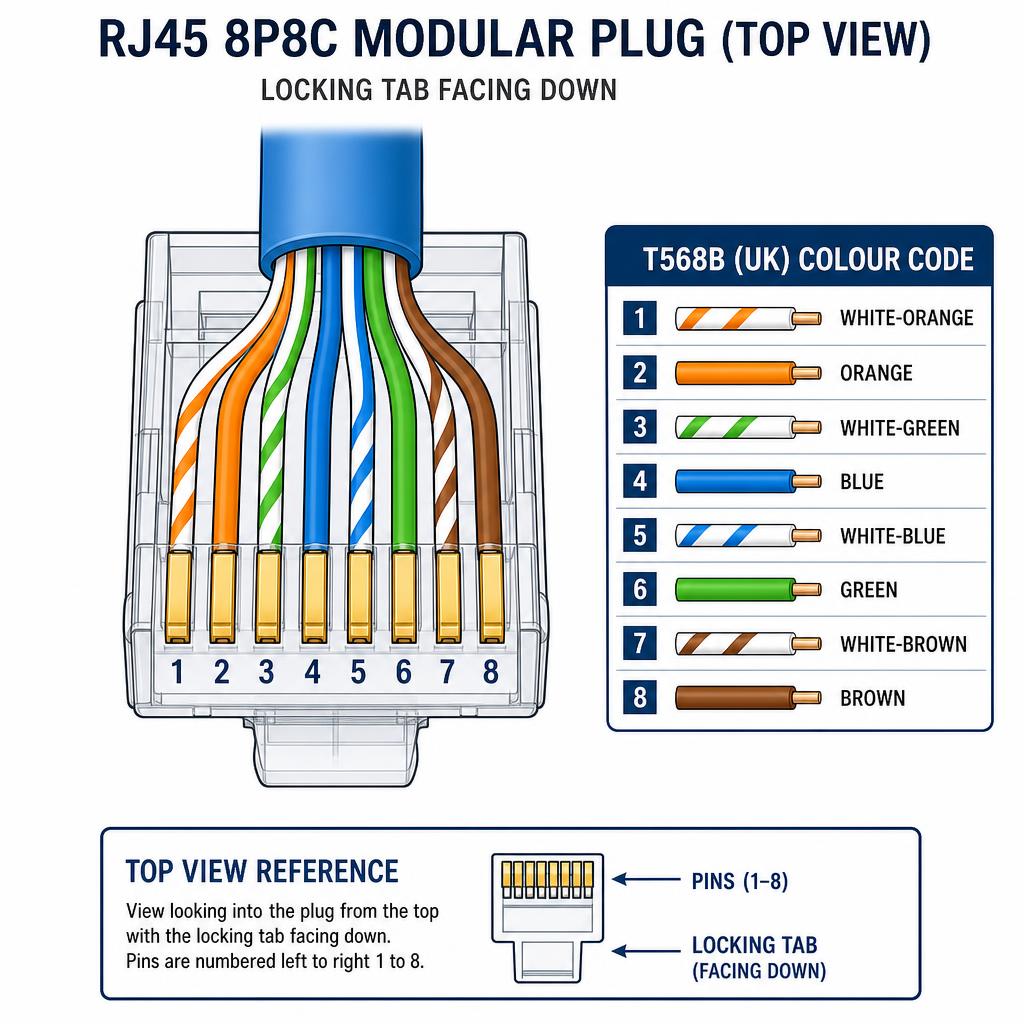
The connector on the end of an Ethernet cable is an 8P8Cplug, universally called an RJ45. In the UK, Paul wires to the T568B colour code at every termination — it is the de-facto UK standard for domestic and commercial structured cabling. What varies is the plug or jack itself:
Standard unshielded RJ45 (U/UTP)
Cat5e and Cat6 unshielded patch leads and equipment tails.
The everyday 8P8C plug used across UK homes. Paul crimps these to a T568B pin-out — the UK convention — using pass-through plugs for a clean, repeatable termination.
Shielded RJ45 (STP / FTP)
Cat6a and any run using shielded/foiled cable.
A metal-bodied plug that bonds to the cable's foil or braid. Essential when the cable is shielded — otherwise the shield is left floating and does more harm than good.
Toolless / field-termination plugs
Solid-core Cat6/6a where a socket isn't practical (e.g. a direct plug into a wall-mounted AP).
Higher unit cost but excellent for a tidy, gel-sealed termination on stiff installation cable.
Keystone jacks (not a plug, but the other end of most runs)
Cat5e, Cat6, Cat6a — punched down onto faceplates or patch panels.
In a proper structured install, cables terminate on keystones at both ends, and short factory patch leads connect the socket to the device. This is what Paul fits at every wall point.
Paul terminates with quality tooling — pass-through crimps and a calibrated crimp tool — and every install is tested with a proper cable certifier, not a cheap continuity beeper. Wire-map, length, skew and PoE integrity are all confirmed before the cabinet is closed.
6. Access points — where the Wi-Fi actually happens
An access point (AP) is a wireless radio at the end of a Cat cable. It doesn't route or hand out IPs — it just turns wired Ethernet into Wi-Fi in one specific location. Paul typically fits ceiling-mounted APs (Ubiquiti UniFi, TP-Link Omada or Ruckus) powered over PoE from the switch, with one AP per floor as a starting point and additional APs for garden offices, garages or large open-plan spaces.
All APs broadcast the same Wi-Fi name (SSID) and password. Your phone and laptop roam between them seamlessly — you don't manually switch networks moving between rooms. This is the difference between "Wi-Fi that works" and "Wi-Fi that works everywhere."
7. Putting it all together
A typical Paul-installed setup looks like this:
  ┌────────────┐   fibre    ┌─────┐  RJ45   ┌────────┐
  │ Openreach  │──────────▶ │ ONT │────────▶│ Router │
  └────────────┘            └─────┘         └────┬───┘
                                                 │ RJ45
                                                 ▼
                                         ┌───────────────┐
                                         │  PoE Switch   │
                                         └──┬──┬──┬──┬───┘
                        ┌───────────────────┘  │  │  │
                        │       ┌──────────────┘  │  │
                        ▼       ▼                 ▼  ▼
                    ┌───────┐ ┌───────┐        ┌──────┐ ┌──────┐
                    │Ceiling│ │Ceiling│        │ Wall │ │ CCTV │
                    │  AP   │ │  AP   │  ...   │socket│ │  NVR │
                    └───────┘ └───────┘        └──────┘ └──────┘
One tidy cabinet. Every cable labelled. Every socket tested. Every room covered. That's the difference between a home network that works today and one that still works when the kids stream 4K in three rooms at once.
Frequently asked questions
Common questions about cable standards, PoE switches, and RJ45 termination in the UK.
- Which Cat cable should I choose for a home network?
- For most homes Paul recommends Cat6 as the sensible default — it handles 1 Gbps to 100 m and 10 Gbps to around 55 m. Cat6a is the upgrade choice for premium installs, longer runs, high-power PoE access points, or anyone wanting 10 GbE at the desk. Cat5e is legacy-grade and only used for existing runs; Cat7/Cat8 rarely justify their cost and termination complexity in a domestic setting.
- What is a PoE switch and why does it matter?
- PoE stands for Power over Ethernet. A PoE switch sends both data and low-voltage power down the same Cat cable, so devices such as ceiling access points, IP cameras and door intercoms only need one cable — no separate socket or plug-top power supply. Paul typically fits a PoE+ or PoE++ switch in the cabinet and patches every access point back to it.
- Do I need a managed switch or is unmanaged enough?
- An unmanaged PoE switch is fine for most households that simply want great Wi-Fi and a few wired ports. Paul recommends a managed switch only when the client needs VLANs — for example, separating CCTV, guest Wi-Fi, or a home office network from the main LAN. Managed switches from Ubiquiti or TP-Link Omada are the brands Paul commonly installs.
- What RJ45 termination does Paul use in the UK?
- Paul terminates every structured cable to the T568B colour code — the de-facto UK standard. On a standard RJ45 8P8C plug viewed with the locking tab facing down and pins 1–8 left to right, the pairs run: white-orange, orange, white-green, blue, white-blue, green, white-brown, brown. He uses pass-through plugs and a calibrated crimp tool for a clean, repeatable joint.
- Should I use shielded or unshielded RJ45 plugs?
- Match the plug to the cable. Unshielded RJ45 plugs are correct for ordinary U/UTP Cat5e and Cat6 cable. If Paul runs shielded Cat6a or FTP cable, he fits shielded metal-bodied plugs and bonds the drain wire to the shield — otherwise the shield is left floating and can actually worsen performance.
- Why does Paul run a separate cable to every room instead of daisy-chaining?
- Structured cabling uses a 'home run' from each wall point or access point back to a central cabinet. Every cable is dedicated, labelled, and tested. Daisy-chaining might save cable on paper, but it creates bottlenecks, makes faults hard to find, and prevents proper gigabit speeds and PoE power reaching the far end.
Thinking about proper structured cabling?
Paul designs and installs whole-home data networks across Sussex — new builds, extensions, and retrofits into existing homes.