Homeowner guide · Illustrated
How to use your fuse board.
An interactive walkthrough of a modern UK consumer unit — the main switch, the MCBs and RCBOs, the surge protection device and its functional indicator, and how to isolate a single circuit or the whole dwelling safely.
Watch the explainer.
A 78-second walkthrough of a real UK consumer unit — the main switch, the MCBs and RCBOs, the surge protection device and its functional indicator, and what to do when a breaker trips and will not reset.
Download the video (MP4, 78s)A typical modern board.
This is a real domestic consumer unit: spare ways on the left, then the circuit MCBs and RCBOs, the red main switch, and the surge protection device on the right with its green functional indicator window. Tap any breaker on the photo — the rocker moves, just like the real thing.
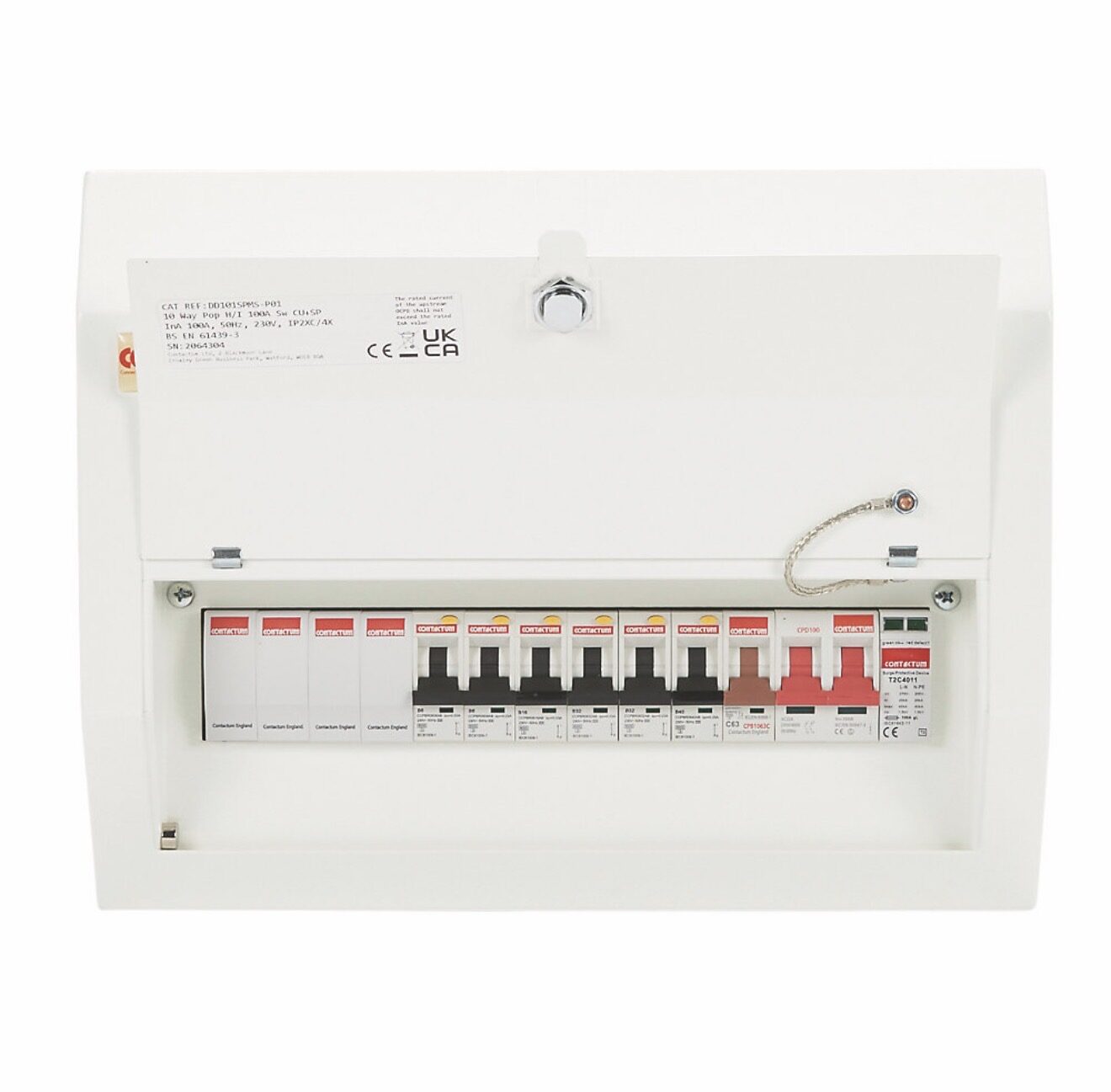
Board energised — tap a breaker on the photo to switch that circuit off.
Try it yourself.
Tap any device on the board below. The lever moves, the busbar shows whether the board is energised, and the panel explains exactly what that device does.
Interactive consumer unit
Board energised. Tap any device to switch it and read what it does.
Step by step
Using the board in real life.
1. Find the board and know the main switch
Most UK homes have the consumer unit near the meter — under the stairs, in a hallway cupboard, in the garage or an outside meter box. Before you need it in a hurry, open the cover and identify the main switch: the biggest switch, normally at one end, often red. Make sure everyone in the house knows where it is and that nothing is stacked in front of it. Keep a torch nearby.
2. Read the circuit schedule
Every board should carry a legible schedule listing what each device feeds — lighting upstairs, sockets downstairs, cooker, shower, boiler, EV charge point. If yours says nothing more than "spare?" in faded biro, ask an electrician to identify and re-label the circuits during your next EICR.
3. Switching a single circuit off
To work on one light fitting or socket, switch that circuit's MCB or RCBO OFF, then prove the circuit is dead with an approved voltage indicator. On a board with a lock-off facility, fit a lock-off device so nobody can switch it back on while you are working.
4. Isolating the whole dwelling
Switch the main switch to OFF. Every circuit goes dead together. Do this before any work on the fixed wiring, before a flood reaches the board, or if you smell burning from the board itself. Remember: the incoming tails, meter and service cutout stay LIVE. Only the DNO or an electrician may work on that side.
5. Restoring power after a trip
Switch the tripped device fully OFF, then ON. If the main switch was turned off, put it back on first, then bring circuits back one at a time so you can see which one causes a re-trip. Check the SPD indicator window while you are there.
Never do this
- · Never remove the cover of the consumer unit — live parts are behind it.
- · Never tape, wedge or hold a breaker in the ON position.
- · Never fit a larger breaker or fuse to stop nuisance tripping.
- · Never touch the meter tails, the meter or the service cutout with the grey/black seal.
- · Never reset a device on a circuit that has been flooded or smells of burning.
If your board still has rewireable fuses, no RCD protection, or a single RCD that takes out the whole house, it is worth reading about a consumer unit replacement. Background reading: RCD / RCBO / AFDD types, surge protection and safe isolation.
Fuse board FAQs
Common fuse board questions.
- Which switch turns off the whole house?
- The main switch — the largest switch on the board, usually at one end and often red. It is a double-pole isolator, so it disconnects every circuit at once. Use it before any work on the fixed wiring, or in an emergency such as flooding or a burning smell. It does not make the meter tails or the supply cutout dead: those stay live at all times.
- What is the difference between an MCB, an RCD and an RCBO?
- An MCB (miniature circuit breaker) protects the cable against overload and short circuit. An RCD (residual current device) protects people by detecting current leaking to earth and disconnecting within 300 ms at its rated residual current — and in about 40 ms at higher fault currents. An RCBO is both in one module, giving each circuit its own overload and earth-leakage protection — so a fault only kills the circuit at fault instead of half the house.
- A breaker has tripped — how do I reset it safely?
- Switch the tripped device fully OFF first, then back ON — a half-way lever will not reset. If it trips again immediately, leave it off: something on that circuit is faulty. Unplug everything on the circuit, reset, then reintroduce appliances one at a time. Never tape, wedge or hold a device in the ON position.
- What is the little green window on the surge protection device?
- That is the SPD's functional indicator. Green means the surge protection module is healthy. Red (or a black/blank window on some makes) means it has absorbed its last surge and no longer protects anything — the rest of the installation carries on working normally, so nothing else will warn you. It must be replaced by an electrician.
- Should my fuse board have a surge protection device?
- Under BS 7671 Regulation 443.4.1 (since Amendment 2:2022) surge protection must be provided where an overvoltage could cause serious injury, loss of life or major disruption; in other cases a risk assessment is required, and if one is not carried out surge protection must be fitted — with an exception for single dwellings where the total value of the installation and equipment does not justify it. In practice most new boards get a Type 2 SPD. Where the building has a structural lightning protection system to BS EN 62305, a Type 1 SPD is required and the lightning protection design must be taken into account.
- How often should I test the RCD protection?
- Press the test button (marked T) on each RCD or RCBO every six months. It should trip instantly. Reset it afterwards and check any clocks or alarms that lost power. If it does not trip, the device is not protecting you — call an electrician.